Vending menu
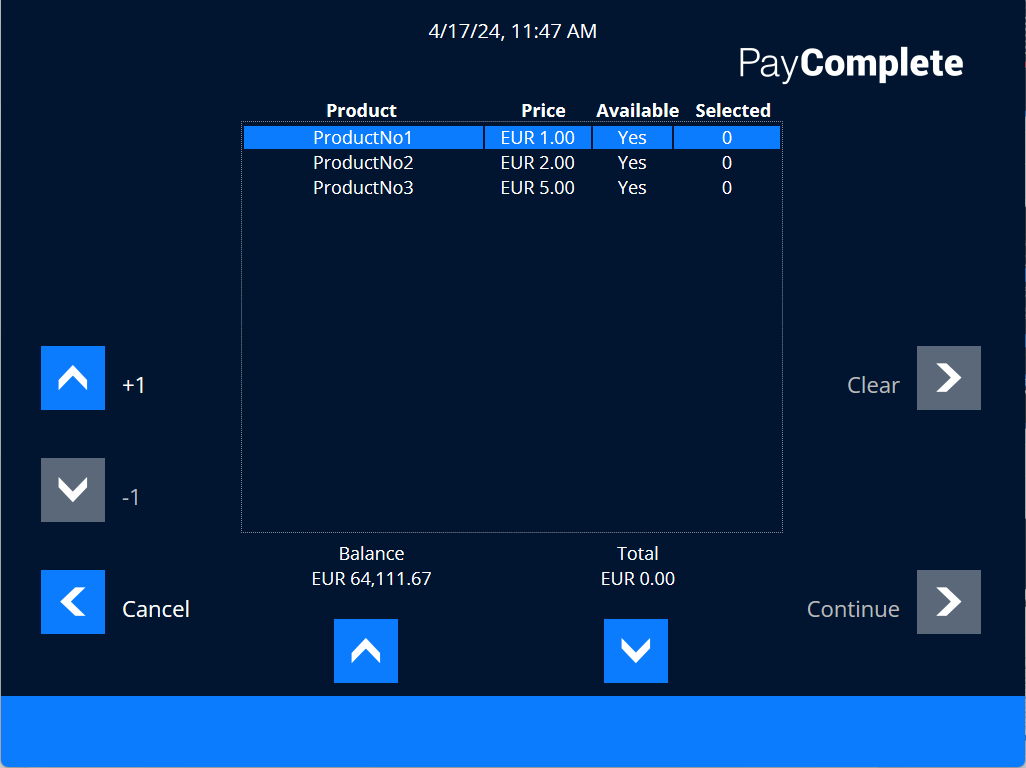
Use the Vending menu to make a purchase from a vending unit.
UI item | Description |
|---|---|
Product | Shows the product name. |
Price | Shows the price of the product. |
Available | Shows whether or not the product is available. |
Selected | Shows how many pieces of the product you have selected. |
+1 | Select the arrow + to add pieces of the selected product. |
-1 | Select the arrow - to remove pieces of the selected product. |
Clear | Select to clear all all the selected products. |
Balance | Shows your balance. |
Total | Shows the total amount to pay. |
Cancel | Select to return to cancel the purchase and return to the previous menu. |
Continue | Select to confirm the purchase and continue to ????? |