Connect on-Device audit logs
Prerequisites:
Connect on-Device version 3.39.0 or later.
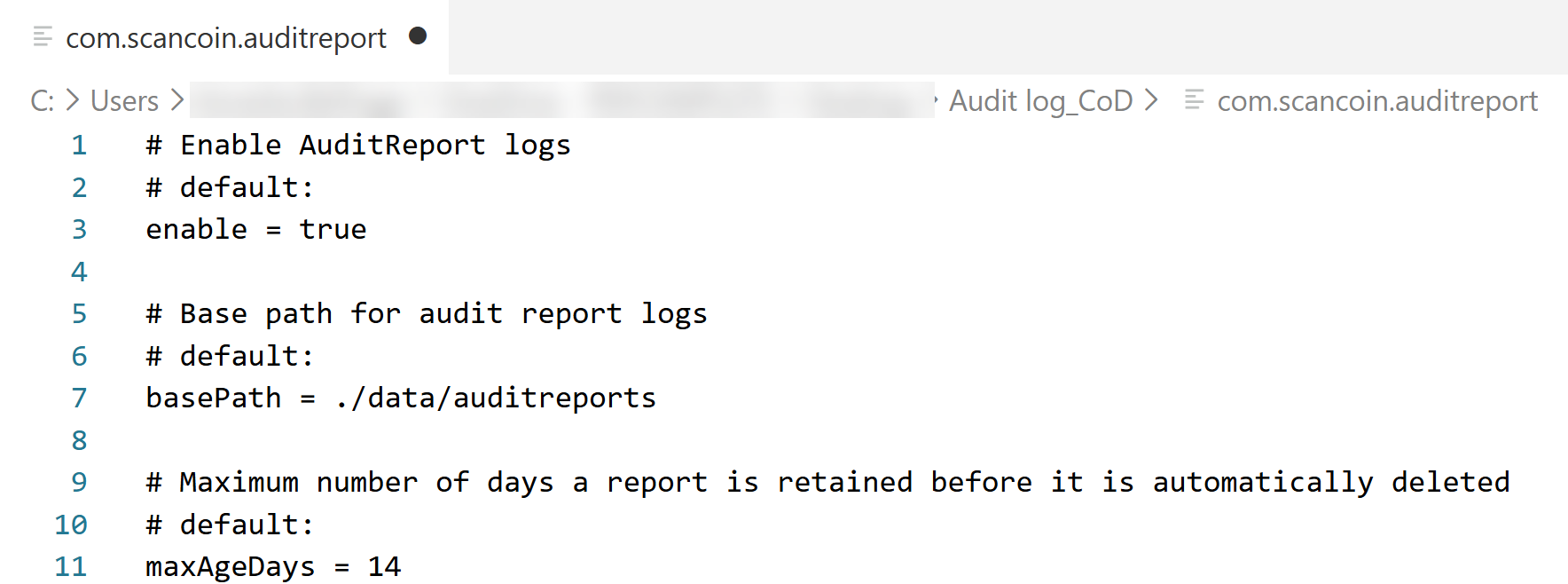
Enable the feature by setting 'enable' to 'true' in
resources/configurable/configuration/com.scancoin.auditreportConfigure the folder where the audit reports are stored in
resources/configurable/configuration/com.scancoin.auditreportConfigure the maximum number of days the report files are stored in
resources/configurable/configuration/com.scancoin.auditreport
Use Connect on-Device audit logs to log activities that take place in Connect on-Device, such as a user logging in or a transaction being completed. Audit logs are device-agnostic and work on the machine on which they were configured. Logged activities are presented with a timestamp and are Connect on-Device specific.
The output is two different CSV files named like this:
[yyyy-mm-dd]_Machine Log.csvMachine logs contain information about the activities on the machine, such as the machine status, when the machine was started, and when the door status changed.
[yyyy-mm-dd]_Machine User Log.csvMachine user logs contain information about activities completed by the users, such as logins and service-flow selections.
Note
The log files are stored locally on the machine.
See also