Connect 2 onboarding pack
Select the relevant link to get information on how to set up your network for Connect.
Connect is a solution hosted on a Kubernetes cluster. Initial tests and adjustments make the platform fully compatible with Google Cloud and AWS from day one. While small adjustments on the deployment side might need to be made to adapt the solution for a specific environment or a cloud provider, the platform should be considered ‘cloud agnostic’.
Requirements
Software
Managed Kubernetes service with the ability to monitor the control plane
S3, Cloud Storage or similar block storage for backups
Hardware
3x VM capable of hosting a database cluster. Each node need to have 8CPUs and 64GB of RAM
5x VM capable of hosting Connect Platform services. Each node is recommended to have XCPUs and XGB or RAM (VM details TBD)
Kubernetes
Attachable volumes need to be hardware-encrypted
Auto-scaling capabilities are recommended
Ingress
Ingress URLs under a single domain
Domain | Port |
|---|---|
connect.yourdomain.com | 443 |
device.yourdomain.com | 1883 or 443 |
storage.yourdomain.com | 9000 |
identity.connect.yourdomain.com | 443 |
api-manager.connect.youromain.com | api-manager.connect.youromain.com |
Additionally, the Kubernetes cluster needs to be accessible directly or via the VPN to deploy software images and manage replication.
Egress for sending metrics and logs
These domains are only allowed for known IPs to prevent access and to send data from unknown sources. It’s possible to create a VPN tunnel betweenPayComplete™ and a tenant to fetch this data.
Purpose | Domain | IP address | Port |
|---|---|---|---|
Metrics data | insert.metrics.cloud.paycomplete.com | 34.117.44.228 | HTTPS (tcp/443) |
Log ingestion | Welcome to nginx! | 34.160.250.210 | HTTPS (tcp/443) |
High-level solution overview
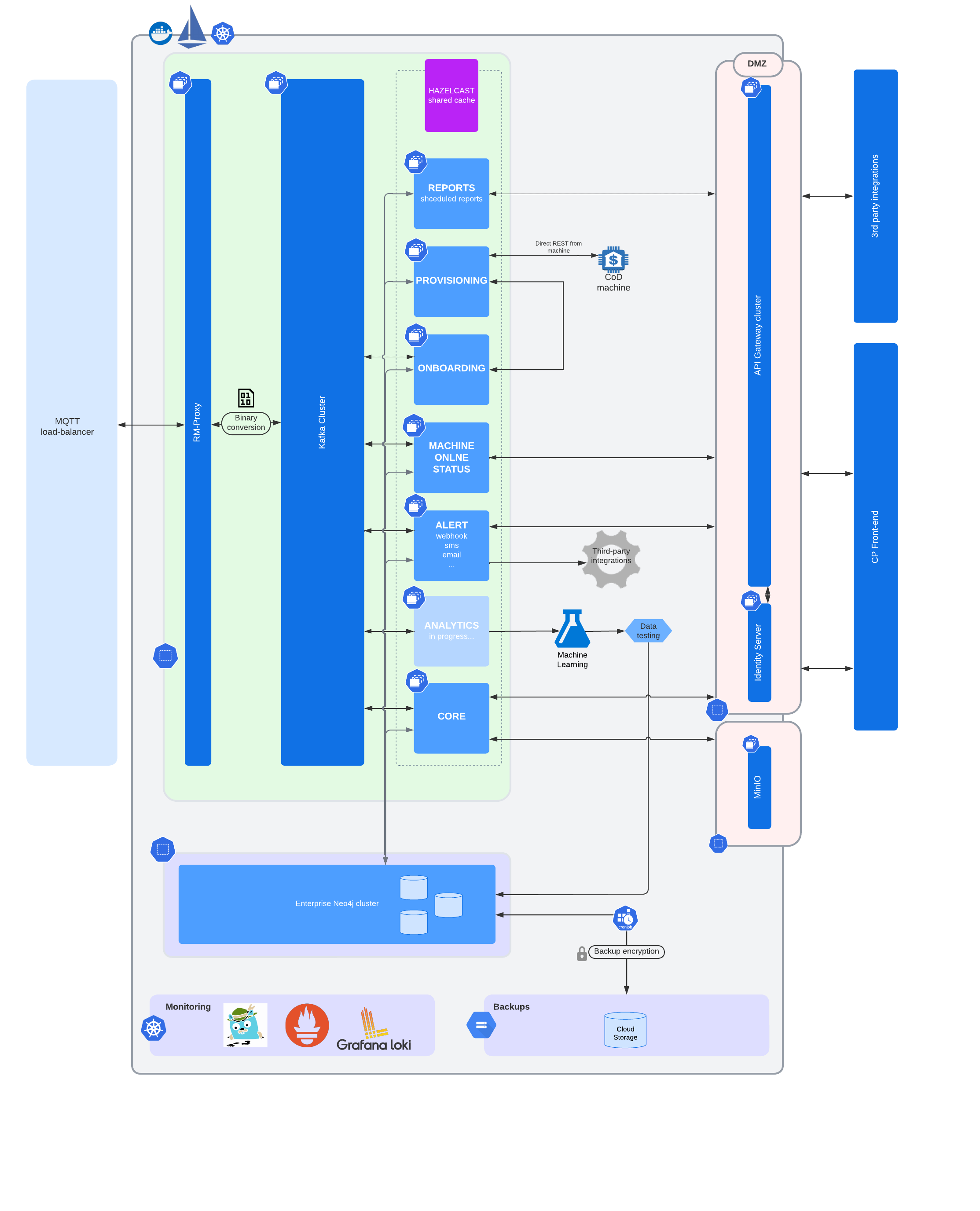
The solution consists of the following elements (hosted in a single Kubernetes cluster):
MQTT Broker acting as an entry point for communication with the machines
Kafka cluster for asynchronous message processing
Neo4j cluster (3 clustered instances) acting as a persistent storage
API gateway acting as an input point for the GraphQL-based API
Multiple services responsible for message processing and delivering business logic
EU cluster (https://connect.cloud.paycomplete.eu )
Glossary
Connect | A cloud-hosted enterprise management and reporting platform. |
Connect on-Device | An open, integrated, hardware-independent machine operating system for payment management devices. Running on Windows or Linux platforms. It is used to control PayComplete™'s hardware solutions. |
Solution | One or many system(s) controlled by Connect on-Device connected to Connect. |
System | Connect on-Device Connect on-Device network-connected PC controlling a coin and/or note recycling, deposit, or dispense device. |
TeamViewer | Remote desktop tool for support purposes. |
Applicable to
All systems provisioned to Connect to
transmit data for reporting purposes
transmit data for configuration purposes
All systems supported under a maintenance contract
Includes these solution types:
CDS (such as CDS-9L)
RCS (such as RCS-Active/700)
SDS (such as SDS-500)
Third-party systems operated with Connect on-Device
General network requirements
1x RJ-45 LAN connection
Port requirement overview
Function | Application | Destination IP | Destination port | ||||||||||||||||||||||||||||||||||||||||||||||
|---|---|---|---|---|---|---|---|---|---|---|---|---|---|---|---|---|---|---|---|---|---|---|---|---|---|---|---|---|---|---|---|---|---|---|---|---|---|---|---|---|---|---|---|---|---|---|---|---|---|
App | Connect | connect.cloud.paycomplete.eu | 443 | ||||||||||||||||||||||||||||||||||||||||||||||
App | Connect | device.cloud.paycomplete.eu | 1883[a] | ||||||||||||||||||||||||||||||||||||||||||||||
App | Connect | storage.cloud.paycomplete.eu | 9000 | ||||||||||||||||||||||||||||||||||||||||||||||
Support | Connect | [a]TeamViewer – The Remote Connectivity Software | TCP 80, 443 TCP/UDP 5938 | ||||||||||||||||||||||||||||||||||||||||||||||
[a] Port 443 may be used instead of standard MQTT-port but needs to be specified | |||||||||||||||||||||||||||||||||||||||||||||||||
Connect network requirements
Diagram
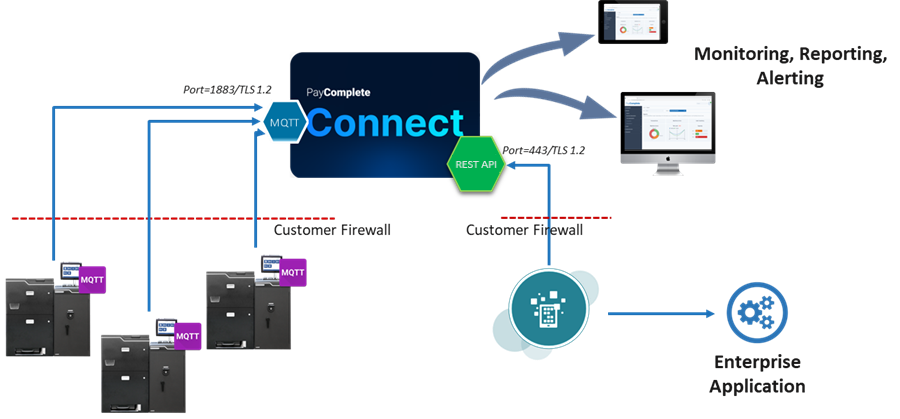
Connect system network requirements (on premise)
All systems require access over standard web SSL port 443
Firewall rules
Allow DNS resolution for device.cloud.paycomplete.eu, storage.cloud.paycomplete.eu, and connect.cloud.paycomplete.eu
Allow unrestricted outbound traffic from all cash handling machines on port 1883 to device.cloud.paycomplete.eu (this will be TLS encrypted traffic)
Allow unrestricted outbound traffic from all cash handling machines on port 443 and to connect.cloud.paycomplete.eu (this will be TLS encrypted traffic)
Allow unrestricted outbound traffic from all cash handling machines on port 9000 to storage.cloud.paycomplete.eu (this will be TLS encrypted traffic)
Allow access to NTP server
Support network requirements
TeamViewer - Network Requirements (on premise)
TeamViewer is PayComplete™’s primary method for remote support.
Firewall rules
Allow outbound traffic from all cash handling machines on port 5938 (if TeamViewer can’t connect over port 5938 it will next try to connect over port 443 and then port 80 – these ports may be made available alternatively but will limit functionality and performance).
TeamViewer – General set-up
The default configuration deployed by PayComplete™ allows employees with access to the console to support users by:
Observing screen activity on the Connect on-Device solutions
Remote controlling the Connect on-Device solutions
Transferring files from and to Connect on-Device solutions
To limit the operational impact, services are unrestricted by default. As a PayComplete™ enterprise policy, systems can only be accessed remotely after coordination with an authorized customer employee.
Licenses
PayComplete™ maintains licenses for its support team allowing remote access to connected systems.
Remote access to devices without a license is not possible and access is limited to PayComplete™ employees with an active account.
Connection security
PayComplete™ uses a combination of ‘Easy Access’ and access via ‘Trusted Device’.
‘Easy Access’ allows PayComplete™ support staff to connect to any devices within a Group that they are assigned to. No password is required once the user is logged on to the PayComplete™ TeamViewer account. No access through TeamViewer to any of the devices is possible if the connection is not initiated from a PayComplete™ TeamViewer account.
‘Trusted Devices’ ensures, that the TeamViewer account can only be accessed after the user has approved the device as a ‘trusted device’ through the company email.
TeamViewer diagram
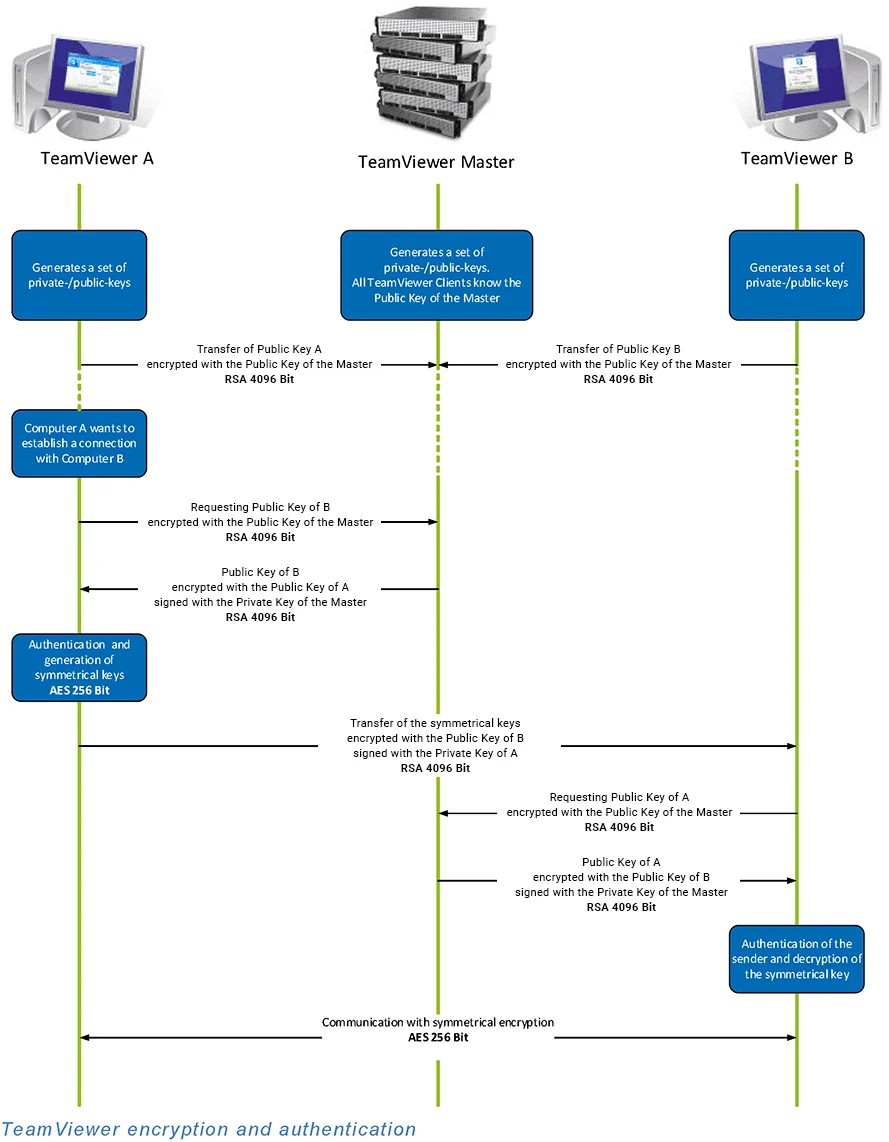
Source: TeamViewer Security and Privacy
TeamViewer Security Statement available for download: https://dl.tvcdn.de/docs/en/TeamViewer-Security-Statement-en.pdf
US cluster (https://connect.cloud.paycomplete.com )
Glossary
Connect | A cloud-hosted enterprise management and reporting platform. |
Connect on-Device | An open, integrated, hardware-independent machine operating system for payment management devices. Running on Windows or Linux platforms. It is used to control PayComplete™'s hardware solutions. |
Solution | One or many system(s) controlled by Connect on-Device connected to Connect. |
System | Connect on-Device Connect on-Device network-connected PC controlling a coin and/or note recycling, deposit, or dispense device. |
TeamViewer | Remote desktop tool for support purposes. |
Applicable to
All systems provisioned to Connect to
transmit data for reporting purposes
transmit data for configuration purposes
All systems supported under a maintenance contract
Includes these solution types:
CDS (such as CDS-9L)
RCS (such as RCS-Active/700)
SDS (such as SDS-500)
Third-party systems operated with Connect on-Device
General network requirements
1x RJ-45 LAN connection
Port requirement overview
Function | Application | Destination IP | Destination port | ||||||||||||||||||||||||||||||||||||||||||||||
|---|---|---|---|---|---|---|---|---|---|---|---|---|---|---|---|---|---|---|---|---|---|---|---|---|---|---|---|---|---|---|---|---|---|---|---|---|---|---|---|---|---|---|---|---|---|---|---|---|---|
App | Connect | connect.cloud.paycomplete.com | 443 | ||||||||||||||||||||||||||||||||||||||||||||||
App | Connect | device.cloud.paycomplete.com | 1883[a] | ||||||||||||||||||||||||||||||||||||||||||||||
App | Connect | storage.cloud.paycomplete.com | 9000 | ||||||||||||||||||||||||||||||||||||||||||||||
Support | Connect | [a]TeamViewer – The Remote Connectivity Software | TCP 80, 443 TCP/UDP 5938 | ||||||||||||||||||||||||||||||||||||||||||||||
[a] Port 443 may be used instead of standard MQTT-port but needs to be specified | |||||||||||||||||||||||||||||||||||||||||||||||||
Connect network requirements
Diagram
Connect system network requirements (on premise)
All systems require access over standard web SSL port 443
Firewall rules
Allow DNS resolution for device.cloud.paycomplete.com, storage.cloud.paycomplete.com, and connect.cloud.paycomplete.com
Allow unrestricted outbound traffic from all cash handling machines on port 1883 to device.cloud.paycomplete.com (this will be TLS encrypted traffic)
Allow unrestricted outbound traffic from all cash handling machines on port 443 and to connect.cloud.paycomplete.com (this will be TLS encrypted traffic)
Allow unrestricted outbound traffic from all cash handling machines on port 9000 to storage.cloud.paycomplete.com (this will be TLS encrypted traffic)
Allow access to NTP server
Support network requirements
TeamViewer - Network Requirements (on premise)
TeamViewer is PayComplete™’s primary method for remote support.
Firewall rules
Allow outbound traffic from all cash handling machines on port 5938 (if TeamViewer can’t connect over port 5938 it will next try to connect over port 443 and then port 80 – these ports may be made available alternatively but will limit functionality and performance).
TeamViewer – General set-up
The default configuration deployed by PayComplete™ allows employees with access to the console to support users by:
Observing screen activity on the Connect on-Device solutions
Remote controlling the Connect on-Device solutions
Transferring files from and to Connect on-Device solutions
To limit the operational impact, services are unrestricted by default. As a PayComplete™ enterprise policy, systems can only be accessed remotely after coordination with an authorized customer employee.
Licenses
PayComplete™ maintains licenses for its support team allowing remote access to connected systems.
Remote access to devices without a license is not possible and access is limited to PayComplete™ employees with an active account.
Connection security
PayComplete™ uses a combination of ‘Easy Access’ and access via ‘Trusted Device’.
‘Easy Access’ allows PayComplete™ support staff to connect to any devices within a Group that they are assigned to. No password is required once the user is logged on to the PayComplete™ TeamViewer account. No access through TeamViewer to any of the devices is possible if the connection is not initiated from a PayComplete™ TeamViewer account.
‘Trusted Devices’ ensures, that the TeamViewer account can only be accessed after the user has approved the device as a ‘trusted device’ through the company email.
TeamViewer diagram
Source: TeamViewer Security and Privacy
TeamViewer Security Statement available for download: https://dl.tvcdn.de/docs/en/TeamViewer-Security-Statement-en.pdf
This topic describes the domains that are exposed from Connect 2 and their purpose.
Use the information when you need to establish the firewall rules for:
machines (especially machines connected to Connect 2 from inside customer-managed networks - most frequently, Ethernet wired devices)
customer services
the Connect 2 Web UI (if customers are accessing it from a network behind a firewall)
Domain | Port | Purpose | Expected clients |
|---|---|---|---|
device.<domain> | 1883 | MQTT broker | machine |
connect.<domain> | 443 | GraphQL APIs REST APIs (that is, provisioning service - /api/v1/provisioning) | machine (provisioning service) Connect 2 Web UI customer services (GraphQL API) |
storage.<domain> | 9000 | File upload/download
| machine Connect 2 Web UI |
identity.<domain> | 443 | Authentication | Connect 2 Web UI customer services (GraphQL API, REST API) |
api-manager.<domain> | 443 | API Gateway management | Internal API Manager administrator (NOTE: may not be exposed on every environment) |