VaultConnect stand-alone installation wizard - Hardware page
Use the Hardware page to select the connected hardware you want to use.
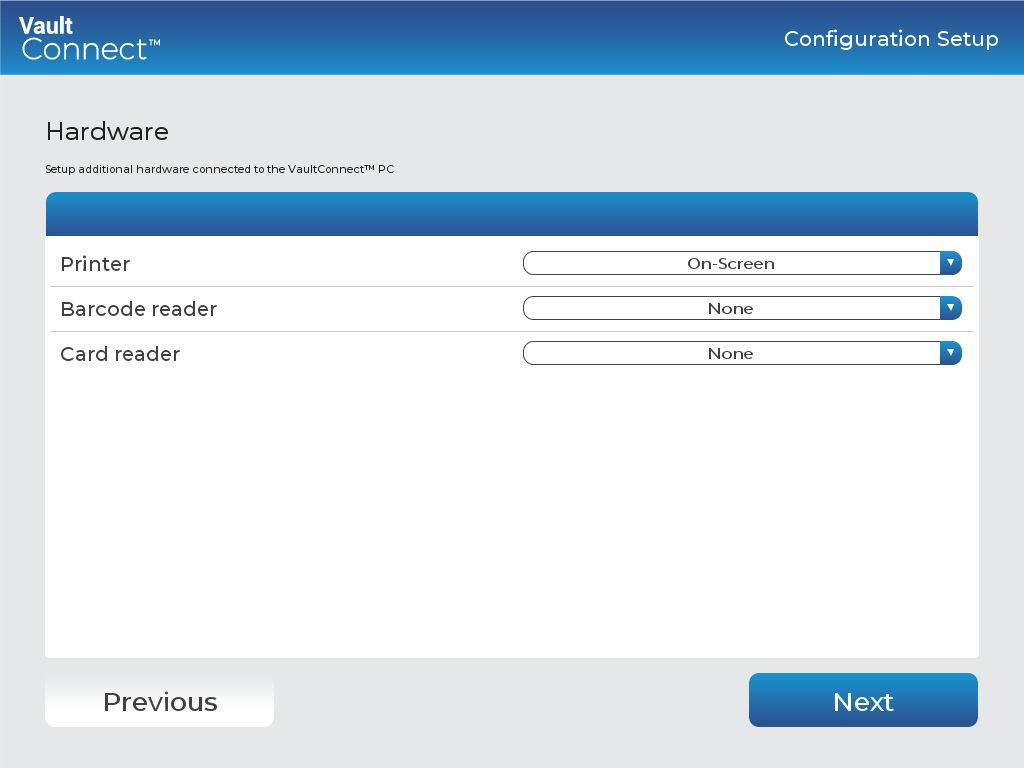
UI item | Description |
|---|---|
Printer | Select printer. The options are:
|
Barcode reader | Barcode reader — select Keyboard wedge if you intend to use a barcode reader. |
Card reader | Card reader — select Keyboard wedge if you want to allow users to authenticate using a card and enter user ID and vault numbers using a standard keyboard (recommended). |
Previous | Click to go to the previous page. |
Next | Click to go to the next page. |
See also
Installing VaultConnect on a stand-alone computer
VaultConnect stand-alone installation wizard - Select Destination Location page
VaultConnect stand-alone installation wizard - Installation mode page
VaultConnect stand-alone installation wizard - Select Components page
VaultConnect stand-alone installation wizard - Ready to Install page
VaultConnect stand-alone installation wizard - Configuration Setup page
VaultConnect stand-alone installation wizard - Edition Selection page
VaultConnect stand-alone installation wizard - Vault Setup page
VaultConnect stand-alone installation wizard - Vault Content Setup page
VaultConnect stand-alone installation wizard - Predefined tills (Retail Edition)
VaultConnect stand-alone installation wizard - Users and Roles page
VaultConnect stand-alone installation wizard - Connect Setup page
VaultConnect stand-alone installation wizard - Connect Setup page