RCS-750N configuration
For RCS-750N, two different flows are supported:
You can configure RCS-750N to wait to print the receipt until the notes are moved from escrow to safe
You can configure RCS-750N to print the receipt as soon as the notes start to move from escrow to safe. This is the fast flow.
When notes are moved from escrow to safe, they pass the banknote validator. At this stage, it sometimes happens that a note that was previously accepted is rejected to the exit slot.
If you select Retract rejects in store, the rejected notes are retracted to the retract box, normally Box 4.
If you clear Retract rejects in store, the user will be asked to take the note, and it won't be part of the deposit.
If you want to use the fast flow, you must select Retract rejected notes in store because the receipt has already been printed.
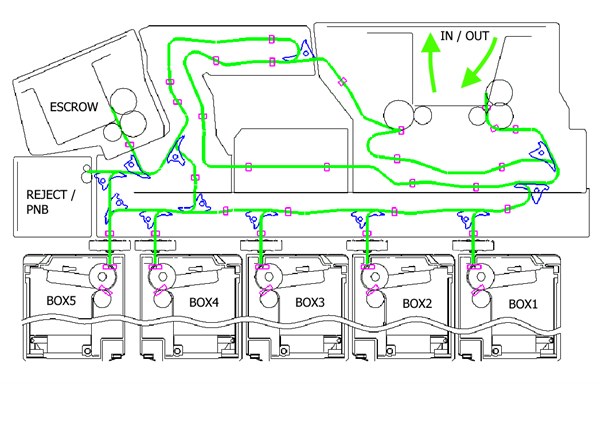
The RCS-750N cash recycling system has 5 boxes. Each box can be a single box or a double box.
You can select Double to get an extra box (B in the image below - the first box is A).
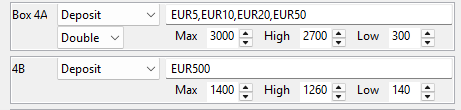
For each of the boxes, you can select one of these functions:
None
Recycling
Deposit
Dispense
Mixed deposit (not tested or supported)
Sorting (not tested or supported)
You can select the notes that go to a specific box by entering a comma-separated list.
EUR5 means all variants of EUR5. EUR5A means only variant A. A single box only allows 16 variants. If you use the wrong format or select an invalid note, an error is displayed.
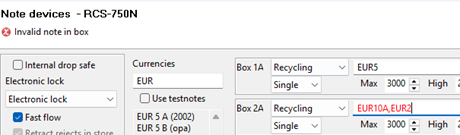
You can only specify one denomination per recycling or dispense box. For each box, you can set Max, High, and Low. The default values are 3000 notes and 10% high or low.