Review before saving
Use the Review before saving view to add or edit user information, such as user name, role, and login conditions.
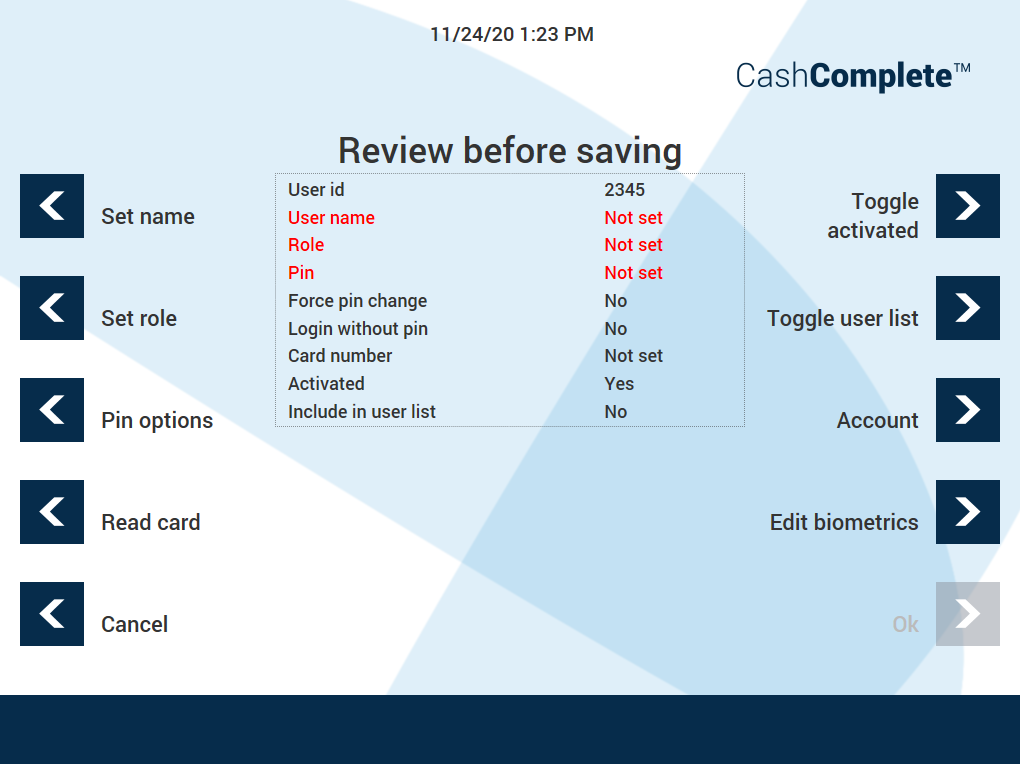
UI item | Description |
|---|---|
Set name | Add or edit the user name. |
Set role | Add or edit the user role. |
Pin options | Add or edit how the users signs in. |
Read card | Select to read the card the user is to use when signing in. |
Cancel | Select to cancel the changes and return to the previous view. |
Toggle activated | Select to activate a user account or to deactivate an active user account. |
Toggle user list | Select to add the account to the user list or to remove an included user account from the user list. |
Account | Select to edit the number of allowed failed logon attempts and to configure activation and expiration dates of the user account. |
Edit biometrics | Select to add or clear fingerprints. |
Ok | Select to save the changes and go to the next view. |