Print machine total
Use the PRINT MACHINE TOTAL screen to print a receipt of the total contents of a machine.
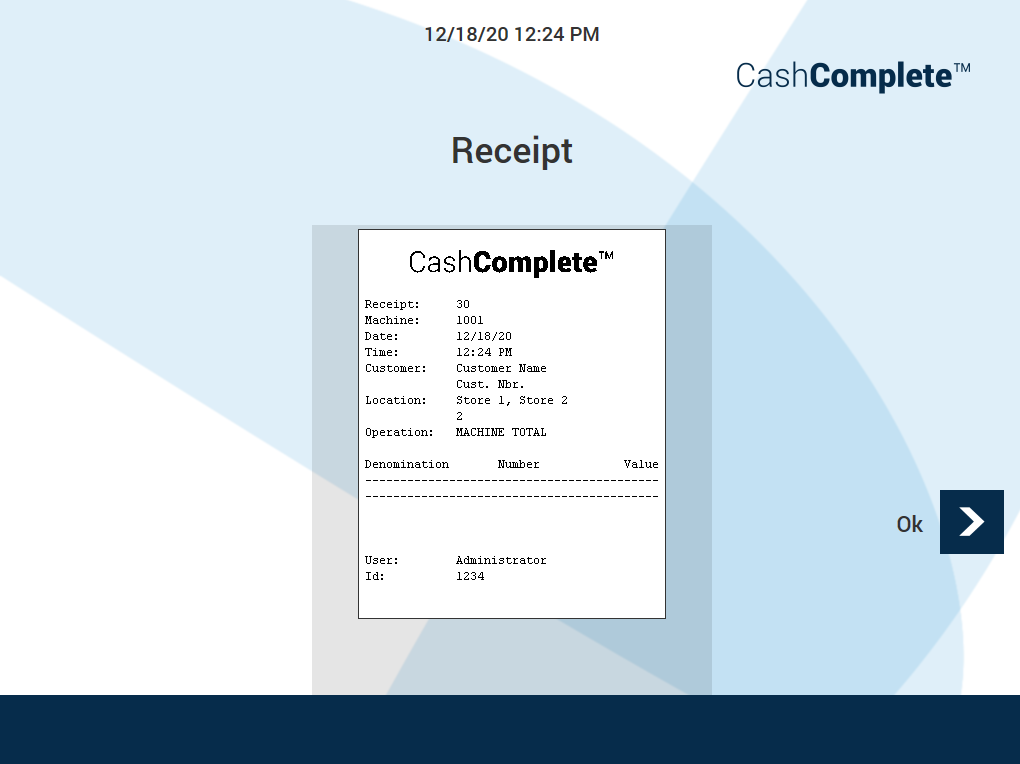
UI item | Description |
|---|---|
Receipt | Shows the receipt ID. |
Machine | Shows the machine alias. |
Date | Shows the date the receipt was printed. |
Time | Shows the time the receipt was printed. |
Customer | Shows the customer name and number. |
Location | Shows the location, for example, the store name. |
Operation | Shows the receipt type. |
Denomination | Shows the denominations of the notes and coins in the machine. |
Number | Shows number of notes or coins of a certain denomination. |
Value | Shows the value of the notes and coins in the machine per denomination. |
User | Shows the user role. |
Id | Shows the user ID. |
Ok | Select to return to the previous screen. |
See also