OrchardMonitorConfig — Logs tab
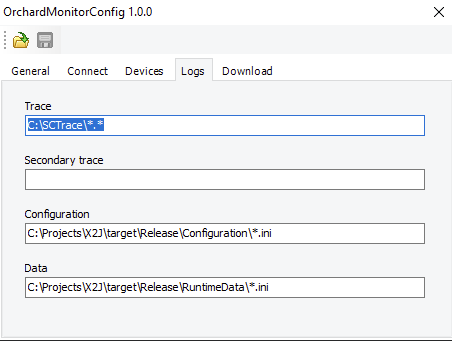
Use the Logs tab to configure the paths to the logs and files you are interested in.
UI item | Description |
|---|---|
Trace | Enter the trace path for all trace files when using retrieve logs in Connect. You can add multiple trace paths by using a semicolon as separator. All subfolders are also scanned. Zip files are extracted before the files are added. |
Secondary trace | Enter the trace path for any extra trace files when using retrieve logs in Connect. You can add multiple trace paths by using a semicolon as separator. Subfolders are not scanned. |
Configuration | Enter the configuration path for all configuration files when using retrieve logs in Connect. You can add multiple paths by using a semicolon as separator. Subfolders are not scanned. |
Data | This setting is for the runtime data path for all runtime data files when using retrieve logs in Connect. You can add multiple trace paths by using a semicolon as separator. Subfolders are not scanned. |