VaultConnect stand-alone installation wizard - Select Destination Location page
Use the Select Destination Location page to select the installation folder for VaultConnect. It is recommended that you keep the default installation folder.
Note
No spaces are allowed in the installation folder path.
Note the disk space requirements at the bottom of the page.
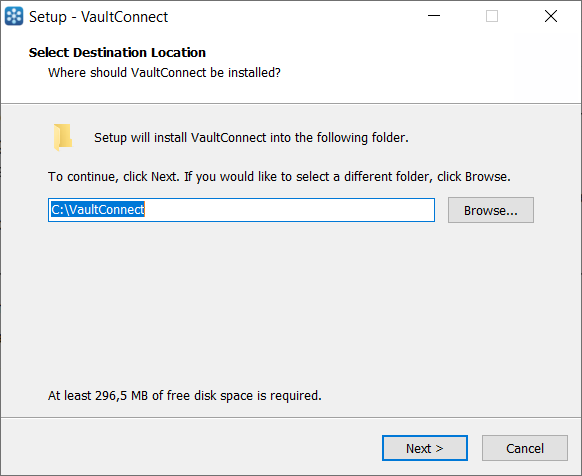
UI item | Description |
|---|---|
Browse | Click to choose a different installation folder than the default folder. |
Next | Click to go to the next page. |
Cancel | Click to cancel the installation and close the installation wizard. |
See also
Installing VaultConnect on a stand-alone computer
VaultConnect stand-alone installation wizard - Installation mode page
VaultConnect stand-alone installation wizard - Select Components page
VaultConnect stand-alone installation wizard - Ready to Install page
VaultConnect stand-alone installation wizard - Configuration Setup page
VaultConnect stand-alone installation wizard - Edition Selection page
VaultConnect stand-alone installation wizard - Vault Setup page
VaultConnect stand-alone installation wizard - Vault Content Setup page
VaultConnect stand-alone installation wizard - Predefined tills (Retail Edition)
VaultConnect stand-alone installation wizard - Users and Roles page
VaultConnect stand-alone installation wizard - Hardware page
VaultConnect stand-alone installation wizard - Connect Setup page
VaultConnect stand-alone installation wizard - Connect Setup page