VaultConnect stand-alone installation wizard - Predefined tills (Retail Edition)
Use the Predefined tills page to select predefined tills (money mixes) that can be selected to automatically populate VaultConnect deposits.
Note
To use predefined mixes on a standard machine, you must have a full Connect on-Device Enterprise license and a Connect Retail Edition.
Yellow highlighted rows indicate that the mix isn't compatible with the vault you have configured.
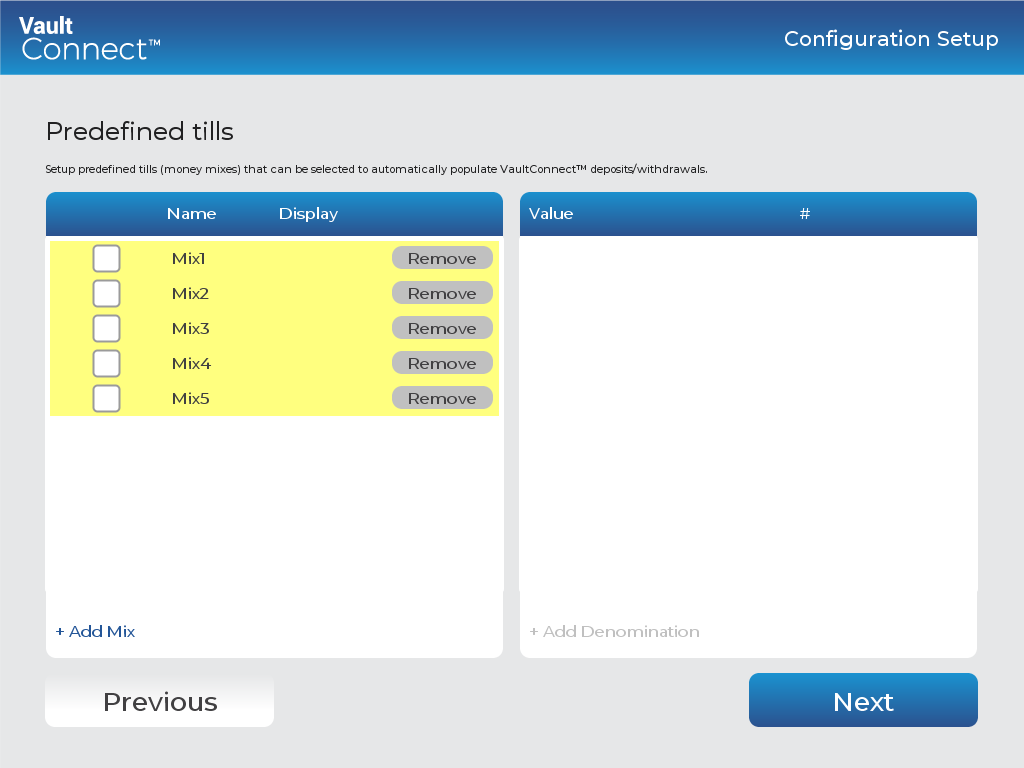
UI item | Description |
|---|---|
Mix | Select a predefined mix to automatically populate VaultConnect deposits. |
Add Mix | Click to add a new mix to the list of predefined tills. |
Add Denomination | Click to add denominations to the selected mix. |
Previous | Click to go to the previous page. |
Next | Click to go to the next page. |
See also
Installing VaultConnect on a stand-alone computer
VaultConnect stand-alone installation wizard - Select Destination Location page
VaultConnect stand-alone installation wizard - Installation mode page
VaultConnect stand-alone installation wizard - Select Components page
VaultConnect stand-alone installation wizard - Ready to Install page
VaultConnect stand-alone installation wizard - Configuration Setup page
VaultConnect stand-alone installation wizard - Edition Selection page
VaultConnect stand-alone installation wizard - Vault Setup page
VaultConnect stand-alone installation wizard - Vault Content Setup page
VaultConnect stand-alone installation wizard - Users and Roles page
VaultConnect stand-alone installation wizard - Hardware page
VaultConnect stand-alone installation wizard - Connect Setup page
VaultConnect stand-alone installation wizard - Connect Setup page