VaultConnect stand-alone installation wizard - Vault Setup page
Use the Vault Setup page to enable the vaults you want to use and select whether deposits and dispenses are done by denomination or by value.
Note
You must set up at least one vault.
If you have purchased an Enterprise Edition license or higher, you can set up maximum five vaults.
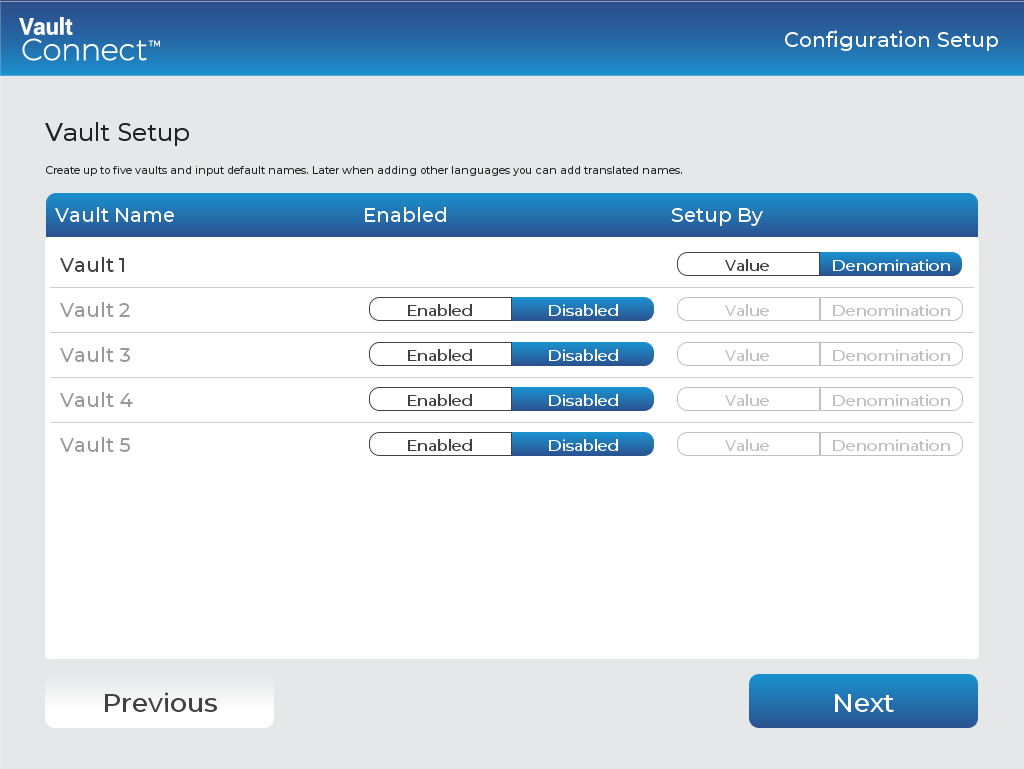
UI item | Description |
|---|---|
Vault Name | Displays the vault name. To change the name, click the current name and type another. |
Enabled | Select to add the vault to VaultConnect. |
Disabled | Select to remove the vault from VaultConnect. |
Value | Select if you want to deposit and dispense by value, that is, by an amount of money regardless of whether the amount of money is in notes or coins of different denominations. |
Denomination | Select if you want to deposit and dispense by denomination, that is by notes and coins of specified denominations. |
Previous | Click to go to the previous page. |
Next | Click to go to the next page. |
See also
Installing VaultConnect on a stand-alone computer
VaultConnect stand-alone installation wizard - Select Destination Location page
VaultConnect stand-alone installation wizard - Installation mode page
VaultConnect stand-alone installation wizard - Select Components page
VaultConnect stand-alone installation wizard - Ready to Install page
VaultConnect stand-alone installation wizard - Configuration Setup page
VaultConnect stand-alone installation wizard - Edition Selection page
VaultConnect stand-alone installation wizard - Vault Content Setup page
VaultConnect stand-alone installation wizard - Predefined tills (Retail Edition)
VaultConnect stand-alone installation wizard - Users and Roles page
VaultConnect stand-alone installation wizard - Hardware page
VaultConnect stand-alone installation wizard - Connect Setup page
VaultConnect stand-alone installation wizard - Connect Setup page