VaultConnect stand-alone installation wizard - Finish page
Use the Finish page to copy the machine ID of the VaultConnect machine and finish the installation.
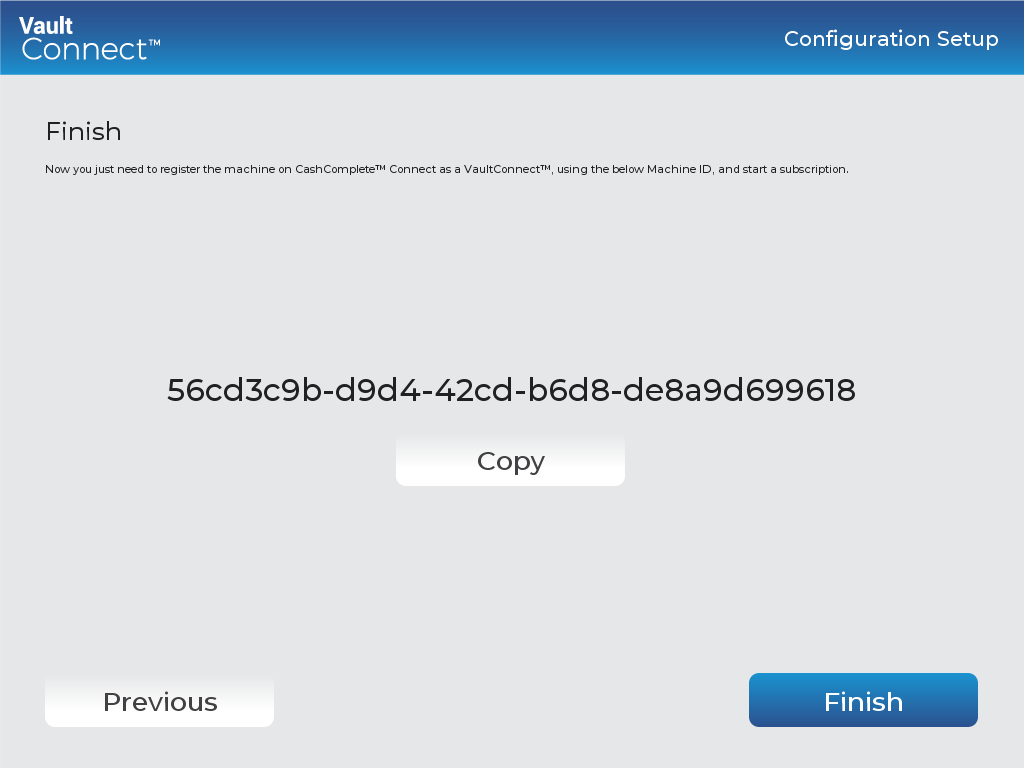
UI item | Description |
|---|---|
Copy | Click to copy the machine ID of the VaultConnect machine. You need the code to register the machine in Connect. |
Previous | Click to go to the previous page. |
Finish | Click to complete the installation and close the wizard. |
Important
Before you can use the software, you need to start a subscription in Connect.
See also
Installing VaultConnect on a stand-alone computer
VaultConnect stand-alone installation wizard - Select Destination Location page
VaultConnect stand-alone installation wizard - Installation mode page
VaultConnect stand-alone installation wizard - Select Components page
VaultConnect stand-alone installation wizard - Ready to Install page
VaultConnect stand-alone installation wizard - Configuration Setup page
VaultConnect stand-alone installation wizard - Edition Selection page
VaultConnect stand-alone installation wizard - Vault Setup page
VaultConnect stand-alone installation wizard - Vault Content Setup page
VaultConnect stand-alone installation wizard - Predefined tills (Retail Edition)
VaultConnect stand-alone installation wizard - Users and Roles page
VaultConnect stand-alone installation wizard - Hardware page
VaultConnect stand-alone installation wizard - Connect Setup page
VaultConnect stand-alone installation wizard - Connect Setup page