OrchardMonitorConfig — General tab
Use the General tab to set up the communication details necessary for XFS communication.
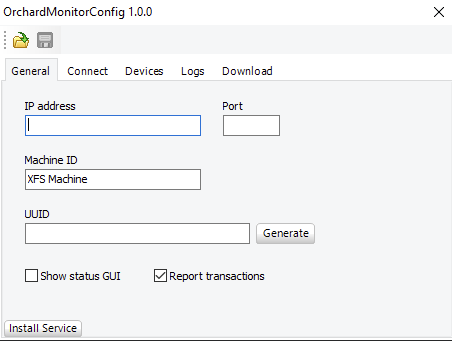
UI item | Description |
|---|---|
IP address | Enter the IP address that should receive the raw JSON messages. |
Port | Enter the port number on which to receive the raw JSON messages. |
Machine ID | Enter the machine ID. This setting is necessary to separate multiple machines on the same site. |
UUID | Enter the universally unique identifier of the machine. This identifier is essential when registering a machine in Connect. Important! When you have saved the UUID, it isn't possible to change it. |
Generate | Select to save the UUID. |
Show status GUI | Select for development or testing purposes. Clear the checkbox before monitoring. By default, this feature is disabled. |
Report transactions | Select to allow deposit and dispense transactions to be reported to Connect. Clear the checkbox if CIM/CDM classes do not support necessary events or if transaction reports are not required. By default, this report transactions are enabled because all PayComplete™ drivers support necessary events. |
Install service | Select the button if no hardware needs any initialization and all hardware can communicate directly after a reboot. Selecting the button installs the monitoring program as a Windows Service. If you want to uninstall the service, you need to do it manually. |