OrchardMonitorConfig — Connect tab
Use the Connect tab to set up the communication details necessary for the XFS drivers to communicate with Connect.
Note
You need to contact PayComplete™ to obtain the IP address, port number, broker user name, broker password, and tenant name.
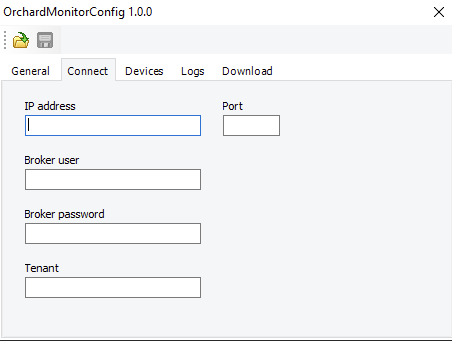
UI item | Description |
|---|---|
IP address | Enter the Connect IP address. |
Port | Enter the Connect port number. By default, the port number is 1883. |
Broker user | Enter the login user name to Connect. |
Broker password | Enter the login password to Connect. |
Tenant | Enter the location of the site and machine in Connect. |