Deposit limits
Prerequisites:
Install Connect on-Device version 3.40.0 or later to use the deposit limits feature.
You configure deposit limits to prevent money laundering.
Deposit limits limit the amount of money a single user, role, or work unit group can deposit during a day. If the deposit limit has been reached, the user, role, or work unit group is not allowed to deposit money until the next day.
When the deposit limit is reached, Connect on-Device automatically terminates any ongoing deposits. Already overpaid amounts are deposited.
Deposit limits apply to all machine types supported by Connect on-Device and are configured for the local machine. Deposit limits work differently for different machine types:
Recyclers — Overpaid money is automatically dispensed
Deposit machines with Escrow — All money in Escrow is given back.
Deposit machines without Escrow — Overpaid money remains in the machine.
Configuring deposit limits
You configure deposit limits in a property file in the Connect on-Device installation folder.
Locate the Connect on-Device installation folder.
Go to the
resources/configurable/configuration/com.scancoin.common.deposit.DepositServicefolder.Open the
resources/configurable/configuration/com.scancoin.common.deposit.DepositServicefile.Use the examples in the file and edit the file to suit the needs of your organization.
Save the file.
You configure deposit limits in the com.scancoin.common.deposit.DepositService file. You find the file in the resources/configurable/configuration/com.scancoin.common.deposit.DepositService folder in the Connect on-Device installation folder.
# Defined value as exponent value. I.e. 50 cents = 50
#
# To define role:
# DailyDepositLimit.role.{roleName}={Currency list}
#
# To define user:
# DailyDepositLimit.user.{userId}={Currency list}
#
# To define work unit:
# DailyDepositLimit.workunit.{workunitName}={Currency list}
#
# A currency list consists of the currency, a colon, and the total value.
# Entries are separated with commas.
# e.g. "EUR:10000, SEK:50000". If a currency is not listed, it will
# be limited to zero.
#
# To configure a default DailyDepositLimits for work units that were not defined using the DailyDepositLimit.workunit.{workunitName}={Currency list}setting:
# DailyDepositLimit.workunit=1000EUR
# DailyDepositLimit.workunit.ABCD=5000EUR
#
# For a work unit with ID XXXX, the limit will be 10 EURO, but for work unit ABCD, the limit will be higher and equal to 50 EURO
#
# A limit for the total machine. This differs from the role limit in that the machine also has an account of its own.
#
# Example
#   DailyDepositLimit.user.1234=EUR:10000
#
# Example (only 100 EUR can be dispensed from the machine in total)
#    DailyDepositLimit.machine=EUR:10000
#
# The daily dispense limit is reset every midnight unless
# DayBreakHour is set.
# Example:
# To set the default DayBreakHour:
#   DayBreakHour=15
#
# Example:
# To set the DayBreakHour for a certain user:
#   DayBreakHour.user.1234=16
# To set the DayBreakHour for a certain work unit:
#   DayBreakHour.workunit.WorkUnit5432=18
Depositing with a deposit limit
Start a regular deposit process. For more information, see Depositing
When you have reached the configured limit, you can't deposit more money that day.
Connect on-Device helps you keep track of how much money you can deposit.
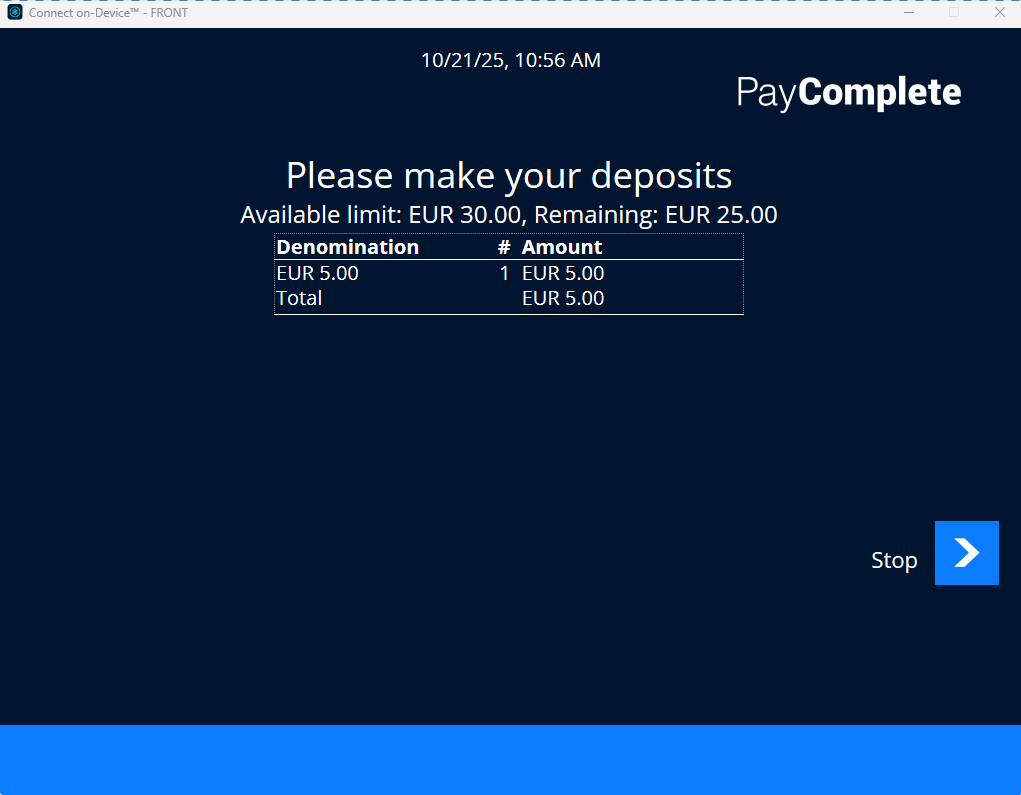
If the device type allows dispenses and you deposit more than the allowed amount, the difference is dispensed.