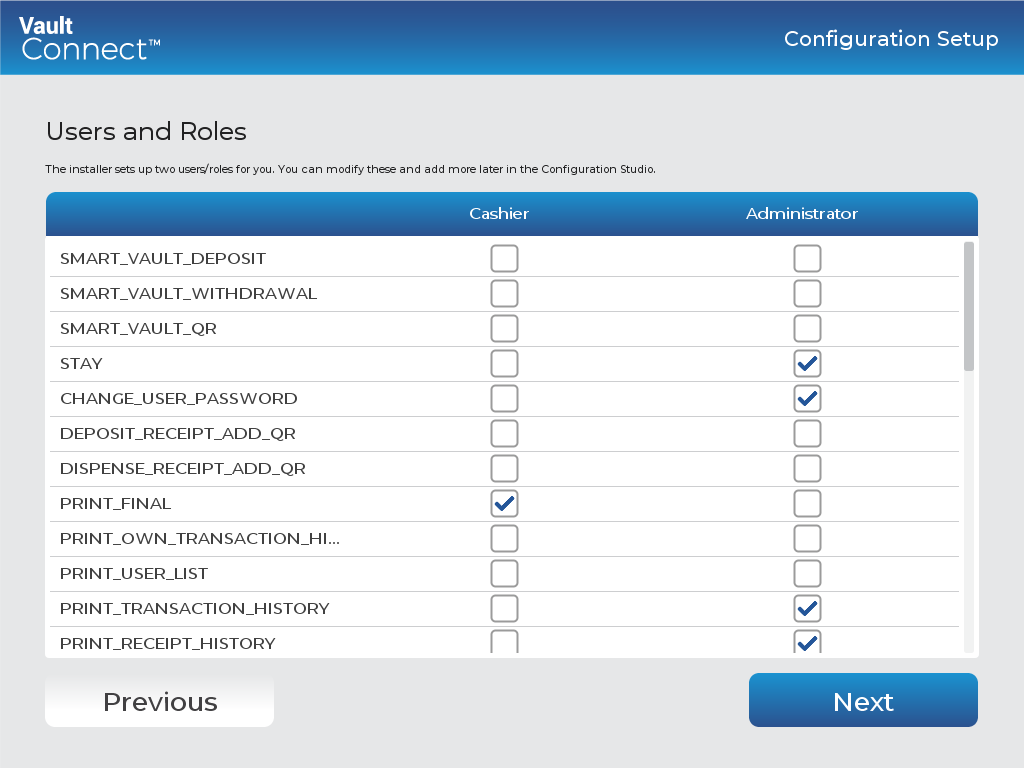
VaultConnect stand-alone installation wizard - Users and Roles page
Use the Users and Roles page to select the permissions you want to grant a certain role. For more information on VaultConnect-related permissions, see VaultConnect™ User Guide.
Note
VaultConnect requires at least one of the following permissions:
SMART_VAULT_DEPOSIT
SMART_VAULT_WITHDRAWAL
UI item | Description |
|---|---|
Cashier | Displays a role for which you can select permissions. |
Administrator | Displays another role for which you can select permissions. |
Previous | Click to go to the previous page. |
Next | Click to go to the next page. |
See also
Installing VaultConnect on a stand-alone computer
VaultConnect stand-alone installation wizard - Select Destination Location page
VaultConnect stand-alone installation wizard - Installation mode page
VaultConnect stand-alone installation wizard - Select Components page
VaultConnect stand-alone installation wizard - Ready to Install page
VaultConnect stand-alone installation wizard - Configuration Setup page
VaultConnect stand-alone installation wizard - Edition Selection page
VaultConnect stand-alone installation wizard - Vault Setup page
VaultConnect stand-alone installation wizard - Vault Content Setup page
VaultConnect stand-alone installation wizard - Predefined tills (Retail Edition)
VaultConnect stand-alone installation wizard - Hardware page
VaultConnect stand-alone installation wizard - Connect Setup page
VaultConnect stand-alone installation wizard - Connect Setup page