Permissions A-L
You add permissions to a user role to control the users' access to a machine. You use Connect on-Device Studio to configure role permissions.
Note
Some permissions require additional permissions to function as intended.
If additional permissions are required, a dialog box automatically opens. Press Ctrl + space in the dialog box to show a list of available additions.
The following permissions are available for software version 3.15 and later. The Role column shows the roles automatically assigned the permission after a clean installation.
Permission | Description | Role |
|---|---|---|
A | ||
ALLOCATION_END_SHIFT_ROLE:name_of_other_role | A temporary role. Activated when the user scans an allocated till. It is recommended to only grant enough permissions to allow a single CCOD Connect on-Device service to be available. When the service is available, Connect on-Deviceautomatically starts the service after the login procedure. When the service has ended or has been canceled, the original role and permissions are restored. | — |
ALLOCATION_START_SHIFT_ROLE | Similar to ALLOCATION_END_SHIFT_ROLE, that is, a temporary role that is activated when the user scans a non-allocated till. See ALLOCATION_END_SHIFT_ROLE for details. | — |
ALWAYS_ALLOW_OPEN_NOTE_SAFE | Permission to open the note safe even if the sealing has failed. | — |
ARTICLE6_COMPARE | Article 6 compare flow. | — |
ARTICLE6_EXTRACT_NOTES | Permission to pick up stored Article 6 notes from a note device. | — |
ARTICLE6_EXTRACT_NOTES_SAFEBAG_COLLECTION | Permission to pick up stored Article 6 notes from a note device with a safe bag. | — |
AUTO_CHANGE | When doing a 'change' transaction, the user can allow Connect on-Device to calculate the change dispense (preferring high denominations first), instead of manually entering the number of different denominations to reach the change amount. | |
AUTO_WORK_UNIT | Automatically gives users the specified work unit. This overrides the WORK_UNIT permission. 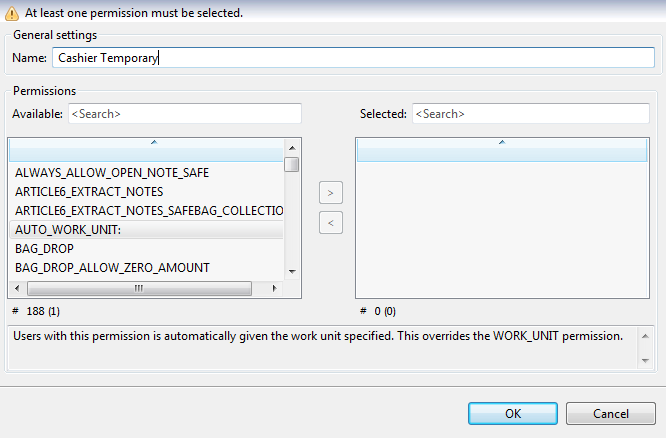 | — |
B | ||
BAG_DROP | Permission to deposit bags. | Administrator, Cashier |
BAG_DROP_ALLOW_ ZERO_AMOUNT | Permission to drop a seal bag without entering any value. Requires BAG_DROP. | Administrator, Cashier |
BAG_DROP_BY_DENOMINATION | It allows the user to select specific denominations during the bag-drop process. The messages sent to Connect also contain the denominations. Available in Connect on-Device version 3.36.0 and later. | — |
BAG_DROP_CUSTOM_DATA | Permission to make a bag drop after entering custom data. | — |
BAG_DROP_CUSTOM_TYPES | Permission to choose custom types of bag drop. Note! This permission requires the BAG_DROP permission. | — |
BAG_DROP_END_OF_SHIFT | Permission to make a bag drop with an END_OF_SHIFT transaction instead of a normal BAG DROP transaction. | — |
BAG_DROP_MULTI | Permission to make several deposits to the same seal bag. | — |
BAG_DROP_MULTI_WORKUNIT | Enables bag drop in the multiple work unit deposit flow. | — |
BAG_DROP_ONCE | The user is not allowed to use Deposit More after a bag drop. | — |
BAG_DROP_ON_MAIN_SCREEN | Displays a separate bag drop flow on the main screen. | — |
BAG_DROP_ON_MAIN_SCREEN_CHANGE_USER | Displays a separate bag drop flow on the main screen for other users. Note! This permission requires the CHANGE_USER permission. | — |
BAG_DROP_SINGLE | Use to only allow one bag per bag drop session. A session is one singel bagdrop operation. This permission blocks the user from entering several bags in one single operation. It stops the 'Please enter amount in bag' screen from appearing Available from Connect on-Device version 3.16.4. | — |
BAG_DROP_SINGLE_DELAY | Use to disable buttons for a period of time before being able to enter the barcode manually. Requires permission BAG_DROP_SINGLE. Available from Connect on-Device version 3.20.0. | — |
BAG_DROP_SINGLE_MANUAL_ENTRY | BAG_DROP_SINGLE_MANUAL_ENTRY:<layout> enables simultaneous manual entry and scanning the barcode. Requires that you enter the name of a keyboard layout file to use, such as [virtualkeyboard.layout]. Available from Connect on-Device version 3.16.4. | — |
BAG_DROP_SINGLE_MANUAL_ENTRY_RE_ENTER | If the barcode is entered manually, this permission requires the user to confirm it by entering the barcode again. Available from Connect on-Device version 3.20.0. | — |
BARCODES_ON_TRANSACTION_RECEIPTS | Permission to include scanned barcodes in Daily Operations and Final receipts. Scanned bar codes are shown within brackets on the row after the amount. | — |
C | ||
CC_ALL RECEIPTS | Permission to show the receipt on screen and then ask whether or not the receipt should be printed. | — |
CC_BOX_RECEIPT | Permission to make a Carbon Copy of all receipts. Prints two copies of all receipts. | CIT, CIT2 |
CCC_SETUP | This permission is needed to register the machine running Connect via the provisioning server and receive the correct Connect settings. | — |
CHANGE | Enables a deposit followed by a free float dispense, limited by the amount deposited. | — |
CHANGE_ALLOW_CANCEL | Permission to cancel a change, even if it is possible to fill the mix. Available from Connect on-Device version 3.6.3. | — |
CHANGE_NO_RECEIPT | Enables, no receipt for CHANGE. | — |
CHANGE_ROLE( true ) | Permission to choose another role from the service menu. * Addition: role ID Available from Connect on-Device version 3.8.0. | — |
CHANGE_SHOW_AVAILABLE_DENOMINATIONS | Displays available denominations/counts before starting {@link #CHANGE}. Available from Connect on-Device version 3.5.0. | — |
CHANGE_SINGLE_RECEIPT | Enables no receipt for deposit during CHANGE. | — |
CHANGE_TIMEOUT | Enables time out during CHANGE. Uses the same time out as DEPOSIT. | — |
CHANGE_USER | Permission to switch to another user by entering the ID of the other user. The original user is still visible on the receipts, in the database, and in the message sent by the RM protocol. | — |
CHANGE_USER_LIMITED: | Permission to change into another specified role. Format role:new_role, for example, cashier:admin_cashier, which means that the user is only allowed to change users belonging to the cashier role, but the role is also changed to admin_cashier in the process. | — |
CHANGE_USER_LOG_OUT_AFTER | Logs out the original user after a CHANGE_USER session. Available from Connect on-Device version 2.14.8. | — |
CHANGE_USER_NO_STAY | Changes back to the original user after a CHANGE_USER session. Available from Connect on-Device version 2.14.8. | — |
CHANGE_USER_PASSWORD | Permission to change the user password. | Administrator, SDS_Administrator, CDS-820j_Administrator |
CHANGE_USER_REQUIRE_PASSWORD | Permission to require a password of the other user for a CHANGE_USER session. | — |
CHOOSE_ROLE( true ) | Permission to choose another role during login. Addition: role ID Available from Connect on-Device version 3.8.0. | — |
CIT | Marks the user as CIT, no other effects. | — |
CLEANING_REMINDER_AT_LOGIN | Displays a reminder at login if a device needs cleaning. | — |
CONFIRM_CLEANING | Clears a cleaning reminder. | — |
CONFIRM_FOUR_EYES | This permission lets the user confirm all specified FOUR_EYES operations, such as EMPTY_NOTE_BOXES_FOUR_EYES and PURGE_COINS_FOUR_EYES. CONFIRM_FOUR_EYES requires an addition. Available from Connect on-Device version 3.16.0. | — |
CONFIRM_SERVICE | Clears a service reminder. | — |
CREATE_SYSTEM_DUMP | Add to a role to show a Create System Dump button in the operator view. Selecting the button creates a zipped file with data, such as logs and configuration, that can be used for troubleshooting. Available from version Connect on-Device 3.17. | — |
D | ||
DAILY_OPERATIONS_EXCLUDE_ROLE | Excludes the role from today's or yesterday's operations, for example, DAILY_OPERATIONS_EXCLUDE_ROLE:cit 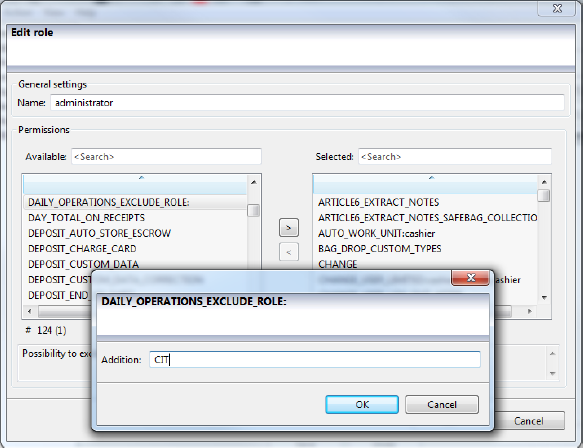 | — |
DAY_TOTAL_KEEP_NEGATIVE | Adds the sum of the previous day's transactions to today's total if the previous day's sum was negative. Requires DAY_TOTAL_ON_RECEIPTS | — |
DAY_TOTAL_ON_RECEIPTS | Adds the sum of the deposits and dispenses during the day in an additional row on the receipt. Available from Connect on-Device version 2.10.1. | — |
DAY_TOTAL_USE_ACCOUNTING_DATE | Adds the sum of the day's transactions on the deposit and dispense receipts. Available from Connect on-Device version 3.9.0. | — |
DAY_TOTAL_USE_SELECTED_ACCOUNTING_DATE | Use to use the selected accounting date instead of the actual time. That is, where the accounting date is the selected accounting date. This permission is an addition to DAY_TOTAL_ON_RECEIPTS. Don't combine with the DAY_TOTAL_USE_ACCOUNTING_DATE permissions. | — |
DEPOSIT | Permission to deposit coins and notes. | Administrator, Cashier, CIT, Maintenance, SDS_Administrator, SDS_Cashier, CDS-820j_Administrator, CDS-820j_Default |
DEPOSIT_AUTO_STORE_ESCROW | Note! Only for machines with shutters. The escrow content is automatically stored when there are no rejects. | — |
DEPOSIT_CHARGE_CARD | Permission to charge a card. If the balance was 0 and the user made a deposit of 10, the new balance is 10. | — |
DEPOSIT_CUSTOM_DATA | Permission to deposit after entering custom data. | — |
DEPOSIT_CUSTOM_DATA_CORRECTION | Permission to make a corrective dispense for a custom data deposit. Custom data deposit refers to deposit and other configurable data. Requires the DEPOSIT_CUSTOM_DATA permission. | — |
DEPOSIT_DISABLE_ESCROW_FUNCTION | Disables return/store escrow buttons and automatically stores the escrow when it is full. Note: Only for HCM. Available from Connect on-Device version 2.17.6. | — |
DEPOSIT_END_OF_SHIFT | Permission to make a deposit with an END_OF_SHIFT transaction instead of a normal DEPOSIT transaction. Available from Connect on-Device version 2.8.5. | — |
DEPOSIT_END_OF_SHIFT_NO_CONFIRM | Removes the confirmation screen on an end-of-shift deposit. Requires the DEPOSIT_END_OF_SHIFT permission. | — |
DEPOSIT_ENTER_EXPECTED_AMOUNT | Enables a deposit of a manually entered expected amount. Available from Connect on-Device version 2.13.0. | — |
DEPOSIT_EXPECTED_AMOUNT | Permission to deposit a preset expected amount. | — |
DEPOSIT_EXPECTED_AUTO_FINISH | If the expected amount is reached, the deposit finishes automatically. | — |
DEPOSIT_EXPECTED_FINISH_ACTIONS | Stops the deposit when the expected amount or more has been deposited. Limits actions after deposit. | — |
DEPOSIT_ID_LAST | This permission is used in combination with the identification options and is needed to sign in after completing a deposit. The permission is required to register the deposited amount for the signed-in user. The reason for this behavior is that there is a default user that is always signed in. | — |
DEPOSIT_INCLUDE_COINS_BUTTON | Only applicable in combination with DEPOSIT_ONLY_NOTES. A button is displayed on the screen to allow the user to include coin devices. Don't use this permission in combination with DEPOSIT_INCLUDE_NOTES_BUTTON. | — |
DEPOSIT_INCLUDE_NOTES_BUTTON | Only applicable in combination with DEPOSIT_ONLY_COINS. A button is displayed on the screen to allow the user to include note devices. Don't use this permission in combination with DEPOSIT_INCLUDE_COINS_BUTTON. | — |
DEPOSIT_MULTI_WORKUNIT | Permission to enter the flow for multiple work unit deposits (cash). | — |
DEPOSIT_MULTI_WORKUNIT_RECEIPT | Prints a receipt after a multi-work-unit deposit. | — |
DEPOSIT_ONCE | Disables the Deposit More function after a cash deposit. Available from Connect on-Device version 3.2.4 and was changed in version 3.43.0. | SDS_Cashier |
DEPOSIT_ONLY_COINS | Similar to DEPOSIT_ONLY_NOTES, that is, the permission starts deposits with only coin devices, even when note devices are available. When this permission is used in combination with DEPOSIT_INCLUDE_NOTES_BUTTON, a button is shown on the screen allowing the user to include a note device. Don't use this permission in combination with DEPOSIT_ONLY_NOTES. | — |
DEPOSIT_ONLY_NOTES | Always starts deposits with only note devices, even when coin devices are available. When this permission is used in combination with DEPOSIT_INCLUDE_COINS_BUTTON, a button is shown on the screen allowing the user to include a coin device. Don't use this permission in combination with DEPOSIT_ONLY_COINS. | — |
DEPOSIT_QUICK_STOP | Disables the clearing cycle for the CAM after pressing Done in a deposit. If this permission is activated, the Done button will be Stop instead. Note: This speeds up the deposit flow but also increases the risk of coins being left in the hopper. | Administrator, CDS-820j_Administrator |
DEPOSIT_RECEIPT_ADD_QR | Adds a QR code containing the deposited money and a unique reference to the transaction to the deposit receipts. | — |
DEPOSIT_RECEIPT_TITLE | Use an alternate title on the deposit receipt. Addition: Translation key or text. For more information, see Setting up CDS-820j/CDS-9L with ID last. | — |
DEPOSIT_REFILL | Enables deposit flow for filling up the machine. The transaction type is REFILL to distinguish from a cashier DEPOSIT. | — |
DEPOSIT_REFILL_SCAN | Enables scanning or manual entry of barcodes before entering deposit refill transactions. Requires DEPOSIT_REFILL. | — |
DEPOSIT_REFILL_SCAN_CONFIRM | Enables confirmation of scanned or manually entered barcodes before entering a deposit flow with a refill transaction type. Requires DEPOSIT_REFILL. | — |
DEPOSIT_REQUIRE_BAG_ID | Disables deposit when Bag ID is empty. | — |
DEPOSIT_REQUIRES_PRINTER | Prevents deposits if no printer is activated. | CDS-820j_Default |
DEPOSIT_RETURN | Permission to return a deposit. | — |
DEPOSIT_RETURN_SURPLUS | Permission to return the surplus of a deposit. | — |
DEPOSIT_SIMPLIFIED_UI | Intended for a smaller display, like on CDS820j, no counting is displayed, only the total sum. | SDS_Administrator, SDS_Cashier, CDS-820j_Default |
DEPOSIT_SINGLE_CCY_UI | Shows the deposit screens with an alternative user interface for a single currency. Only available if there are at least two selectable currencies, that is, < = 2. | — |
DEPOSIT_STORE_ESCROW | Permission to store content in escrow without the escrow being full (for machines with shutter). | — |
DEPOSIT_TIMEOUT_EXTENSION:n | When enabled, if a deposit times out (standard timeout from resources/configurable/configuration/com.scancoin.core.userpref.UserPreference - idle.timeout.DEPOSIT=300), a new screen will display a countdown from n to 0. When the countdown reaches 0, the transaction is completed. Using this permission to time out the 'Empty Escrow' process requires the RETURN_ESCROW_TIMEOUT permission. | — |
DEPOSIT_USE_ONLY_BAG | Forces to deposit only to bag or any other deposit box (canvas/stacker cassette...). Note: This only applies to some recycler devices (CIMA). | — |
DEPOSIT_USE_ONLY_RECYCLERS | Forces the deposited money to go only into rolls or similar recycling cassettes. Note: This only applies to some recycler devices (CIMA) | — |
DEVICE_INFO | Permission to view and print device information. | — |
DISABLE_CONTAINER_SECURITY | Disables any security system that is connected to the money containers (during maintenance). For instance: Disable the ink security in the r2m cassette (MEI)). For more information, see Installing hardware. | — |
DISABLE_NTP | Disables network time synchronization and enables you to manually set the system time. Requires SET_SYSTEM TIME. Available from Connect on-Device version 3.16.5. | — |
DISPENSE: | Enables dispense of one mix. The mix name (not the display name) must be entered by typing. 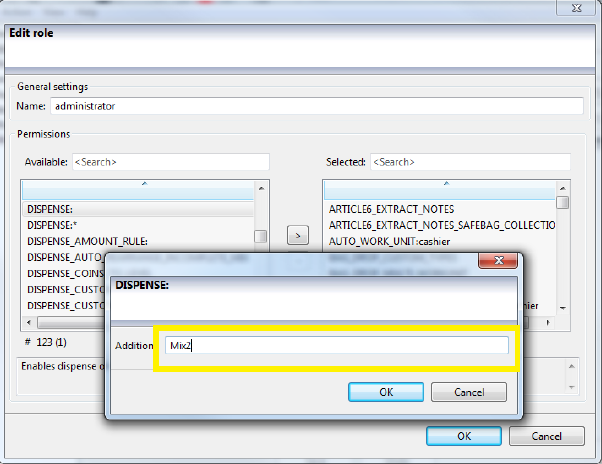 | Cashier |
DISPENSE:* | Enables dispense of all defined money mixes. | — |
DISPENSE_AMOUNT_RULE | Limits denominations allowed to dispense. Add the DISPENSE_AMOUNT_RULE permission using Connect on-Device Studio. Add the dispense rule in the Additional field. 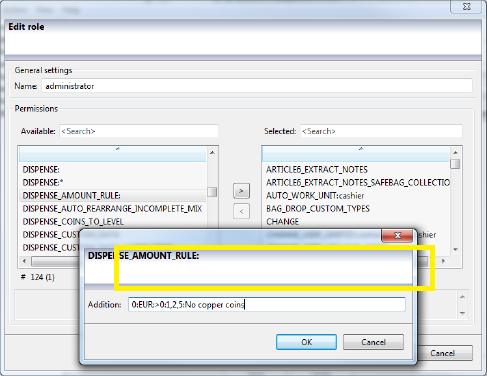 Example 1: 0:EUR:>0:1,2,5:No copper coins Rule number: 0 Denomination: EUR Condition: >0 (any dispense larger than 0 EUR is affected by rule 0) Denominations that will not be dispensed in cents: 1, 2, 5 Information text displayed: No copper coins  Example 2: 1:EUR:<100000:50000:No EUR 500 for amounts below EUR 1000 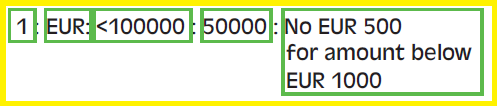 Rule number: 1 Denomination: EUR Condition: <100000 (any dispense below 1000 EUR (100 000 cents) is affected by rule 1) Denominations that is not dispensed in cents: 50000 Information text displayed: No EUR 500 for amounts below EUR 1000 The permission is used in combination with DISPENSE_ENTER_REQUESTED_ AMOUNT and DISPENSE_ENTER_MULTI_REQUESTED_ AMOUNTS. | — |
DISPENSE_AUTO_REARRANGE_INCOMPLETE_MIX | Needed for automatic selection of an alternative mix. Use this permission to let Connect on-Device calculate an optional mix when the desired mix isn't available. | — |
DISPENSE_COINS_TO_LEVEL | Permission to dispense coins to the outlet until the low level is reached. | — |
DISPENSE_COINS_TO_TARGET_LEVEL | Enables dispense of coins to the outlet until the target level is reached. | — |
DISPENSE_CUSTOM_DATA | Permission to dispense after entering custom data. Enable the permission. Edit the | — |
DISPENSE_CUSTOM_DATA_CORRECTION | Permission to correct a dispense custom data transaction with a deposit. Requires the DISPENSE_CUSTOM_DATA permission. | — |
DISPENSE_CUSTOM_DATA_SELECT_MIX | Activates the selected mix in the custom data flow. | — |
DISPENSE _ENTER_MULTI_REQUESTED_ AMOUNTS | Permission to enter multiple requested amounts to dispense. Overrides any DISPENSE:xxx and/or free float. | — |
DISPENSE _ENTER_REQUESTED_AMOUNT | Permission to enter a single requested amount to dispense. Overrides any DISPENSE:xxx and/or free float. Available from Connect on-Device version 2.13.0. | — |
DISPENSE_FOUR_EYES | Prompts another user with permission to make a dispense. Requires the DISPENSE permission. Available from Connect on-Device version 3.16.0. | — |
DISPENSE_MULTI_WORKUNIT | Permission to enter the flow for multiple work unit dispense. To get a receipt, also grant access to DISPENSE_MULTI_WORKUNIT_RECEIPT permission. | — |
DISPENSE_MULTI_WORKUNIT_RECEIPT | Creates one receipt per work unit dispense. | — |
DISPENSE_NOTES_TO_TARGET_LEVEL | Enables dispense of notes to the target level. | — |
DISPENSE_OVERFLOW_NOTES | Permission to dispense overflow notes. The permission is controlled by | — |
DISPENSE_OVERFLOW_NOTES_ALLOW_EDIT | Permission to dispense notes from recycling boxes. Provides permission to edit the overflow dispense mix, that is, the amount of banknotes to remain in the machine. | — |
DISPENSE_RECEIPT_ADD_QR | Adds a QR code with transaction data on dispense receipts, that is, the dispensed money and a unique reference to the transaction. | — |
DISPENSE_REMOTE_MIX | Permission to dispense mixes provided by a server somewhere. | — |
DISPENSE_REQUESTED_AMOUNT | Permission to dispense a preset requested amount. | — |
DISPENSE_REQUESTED_AMOUNT_EXACT | If the exact amount cannot be dispensed, the operation is canceled. The default behavior is exact, overpay, then underpay. Requires the DISPENSE_REQUESTED_AMOUNT_UNDERPAY permission. Available from Connect on-Device version 3.15.7. | — |
DISPENSE_REQUESTED_AMOUNT_OVERPAY | If the exact or overpay amount cannot be dispensed, the operation is canceled. The default behavior is exact, overpay, then underpay. Requires the DISPENSE_REQUESTED_AMOUNT_UNDERPAY permission. Available from Connect on-Device version 3.15.7. | — |
DISPENSE_REQUESTED_AMOUNT_UNDERPAY | If the exact or underpay amount cannot be dispensed, the operation is canceled. The default behavior is exact, overpay, then underpay. Requires the DISPENSE_REQUESTED_AMOUNT_UNDERPAY permission. Available from Connect on-Device version 3.15.7. | — |
DISPENSE_RESERVATION | Makes a reservation/delay of a dispense if the selected mix exceeds a configured amount. | — |
DISPENSE_RESERVATION_CANCEL | Permission to delete a previously reserved mix. | — |
DISPENSE_RESERVATION_CANCEL_LIMITED | Permission to view/delete reservations by users with a matching role added in the Addition text box. | — |
DISPENSE_TO_TILLBOX_ONLY | Limits the permission to dispense to the till box only. | — |
DISPENSE_TO_TRANSPORTBOX_ONLY | Limits the permission to dispense to the transport box only. | — |
E | ||
EDIT_DEPOSIT_COMMISSION | Permission to set a commission for deposited money after login. The commission is set as 5.00=5%. | Administrator, CDS-820j_Administrator |
EDIT_INCOMPLETE _MIX | Permission to select an incomplete mix is shown in the free float screen. The amount is limited to the mix amount. Add EDIT_MIX if no limit is desired. | Cashier |
EDIT_MIX | Permission to edit a selected predefined money mix. | — |
EDIT_USERS | Permission to add/delete users. | Administrator, SDS_Administrator, CDS-820j_Administrator |
EDIT_USERS_LIMITED | Permission to add/remove/edit certain roles only. Available from Connect on-Device version 2.17.6. | — |
EDIT_WORKUNITS | Permission to add/edit/delete work units. | Administrator |
EMPTY_NOTE_BOXES | Permission to empty the note bag/box. Activate permission only, not replenish. For NMD 100, use REPLENISH. Note! This permission is also valid for coin boxes in CDS 820j. | Administrator, CIT, CIT2, SDS_Administrator, SDS_CIT, CDS-820j_Administrator, CDS-820j_Cashier |
EMPTY_NOTE_BOXES_AUTO_SELECT_ONE_BOX | With this permission, if there is only one box to empty, the box is automatically selected. | — |
EMPTY_NOTE_BOXES_CLEARS_BAG_DROP | If this permission is set, EMPTY_NOTE_BOXES also clears bag drops. | — |
EMPTY_NOTE_BOXES_FOUR_EYES | Requires a second user with this permission to sign in to perform the function EMPTY_NOTE_BOXES. Available from Connect on-Device version 3.16.0. | — |
EMPTY_NOTE_BOXES_MANUAL_ENTRY_DELAY | Use to disable buttons for a period of time before being able to enter the barcode manually. Available from Connect on-Device version 3.20.0. | — |
EMPTY_NOTE_BOXES_MANUAL_ENTRY_RE_ENTER | If the barcode is entered manually, this permission requires the user to confirm it by entering the barcode again. Available from Connect on-Device version 3.20.0. | — |
EMPTY_NOTE_BOXES_NO_MANUAL_ENTRY | Disables manual entry of barcode when emptying note boxes. When you scan a new bag/cash box when replacing the bag, you can't enter the barcode manually. If this permission is granted to the user, the 'Manual Entry' button is not visible. If there is no barcode scanner, the button is visible. Available from Connect on-Device version 3.15.3. | — |
EMPTY_NOTE_BOXES_SCAN | Enables scanning or manual entry of barcode before emptying the note box. Requires an Addition device: box name, for example, HCM.1:AB0 Enter * in the Addition text box to include all devices and all note boxes. Find the box name in the Cash Unit file. Requires the permission EMPTY_NOTE_BOXES. | — |
EMPTY_NOTE_BOXES_SCAN_MANDATORY | Prevents the user from replacing a bag or box without an external ID. Available from Connect on-Device version 3.16.0. | — |
EMPTY_NOTE_BOXES_SELECTIVE | Permission to empty selective cash boxes instead of all at once. Requires an Addition. Requires the permission EMPTY_NOTE_BOXES EMPTY_NOTE_BOXES_SELECTIVE<dev>:<box> only applies to the device in question. That is, EMPTY_NOTE_BOXES_SELECTIVE:HCM.1:AB0 only allows emptying of AB0 of the HCM, but any/all boxes of other devices. The old behavior (discarding all boxes not in SELECTIVE) can be restored by setting Misc.properties empty_note_boxes_selective_strict = true | — |
EMPTY_NOTE_BOXES_TIMELIMIT | Allows you to set a time range during which the user is allowed to empty note boxes. The format is <HH>:<mm>-<HH>:<mm>. Available from Connect on-Device version 3.15.0. | — |
EMPTY_REFILL | Permission to empty the devices and refill them. Requires the EMPTY_NOTE_BOXES permission | — |
EMPTY_TRANSPORT_BOX | Permission to empty the transport box. | Administrator, CIT |
EMPTY_TRANSPORT_BOX_ON_FIRST_LOGIN | Permission to empty the box on first sign-in. | — |
EMPTY_TRANSPORT_BOX_SCAN | Prompts the user to provide a scanned barcode before emptying the transport box. Requires the EMPTY_TRANSPORT_BOX permission. | — |
ENABLE_NTP | Permission to use network time synchronization. Currently only supported on machines running Linux. Available from Connect on-Device version 3.16.5. | — |
END_OF_SHIFT_PRINT_FINAL | Prints the Final receipt. | — |
END_SHIFT | Ends the shift - sends an empty END_OF_SHIFT_TRANSACTION. Reduces the risk of incomplete end-of-shift deposits. Available from Connect on-Device version 3.9.1. | — |
END_SHIFT_AFTER_DEPOSIT | Adds a button to run the end-shift flow after deposit. Available from Connect on-Device version 3.9.1. | — |
F | ||
FREE_FLOAT | Permission to access the free float dispense. | Administrator, Cashier, CIT2 |
FREE_FLOAT_AMOUNT_LIMIT | Adds an amount limit to the free float selection. | — |
FREE_FLOAT_KEY | Permission to define custom add buttons per denomination in free float. Specify the currency and denomination (<<Denom>>, for example, 100 for EUR 1.00) that you want to have custom buttons for, and the quantity that should be added with the button (<<Quant>>) and the text for the button (<<Name>>). 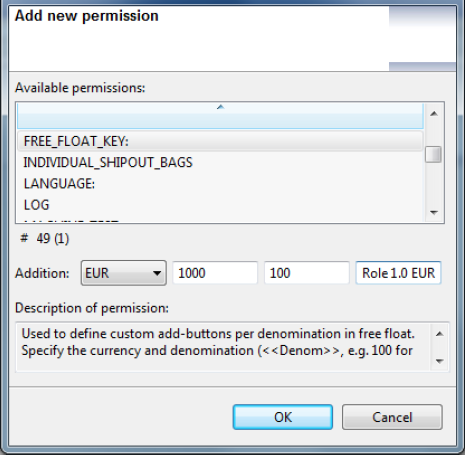 | — |
FREE_FLOAT_MULTI_WORKUNIT | Allows the user to enter the flow for multiple work unit free float dispenses, that is, scan a work unit and then free-float dispense again and again. | — |
FREE_FLOAT_NUMERIC_KEYPAD | Enables the numeric keypad for changing free float dispense quantities. | — |
FREE_FLOAT_RHS_KEYBOARD | This permission places a free-float numeric keyboard on the right-hand side of the free-float table. | — |
FREE_FLOAT_VALUE_INPUT | Permission to input/display amounts instead of quantities in free float. | — |
H | ||
HIDE_INFO_ICON | Permission to hide the info icon on the screen. | SDS_Cashier, CDS-820j_Default |
I | ||
IGNORE_DISPENSE_DELAY | Allows the user to ignore any active dispense delays. | — |
INDIVIDUAL_EMPTY_REFILL | Permission to partly empty/refill without having to empty/refill the entire machine. A separate transaction is created for each emptied cash box. | — |
INDIVIDUAL_SHIPOUT_BAGS | Permission to ship out selected bags from the drop safe without having to empty the entire safe. Note! Requires REPLENISH permission. | — |
L | ||
LANGUAGE | Changes the language at user log-in and during the whole session. Note: Specified in the \”Addition\” box. For more information, see Configuring languages. Available from Connect on-Device version 2.14.0. | — |
LOG | Permission to view the journal file from the service terminal. Depends on the Service mode permission. | Administrator, SDS_Administrator, CDS-820j_Administrator |
LOGIN_FOUR_EYES | Prompts another user with the permission to sign in. Available from Connect on-Device version 3.16.0. | — |